Harmony Pulse Get in touch

A coach in your ear that listens to two hearts.

Harmony Pulse reads a heart-rate strap on your horse and one on you. It speaks short cues while you ride and writes up the session afterwards. All of it runs on your phone, with no wifi or cell service.

Two straps
one on the horse, one on the rider
No signal needed
everything runs on the phone
In testing
with real horses
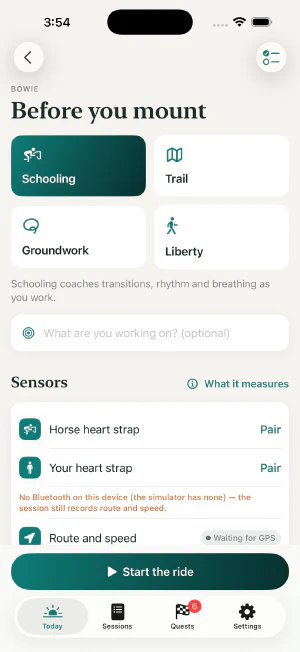
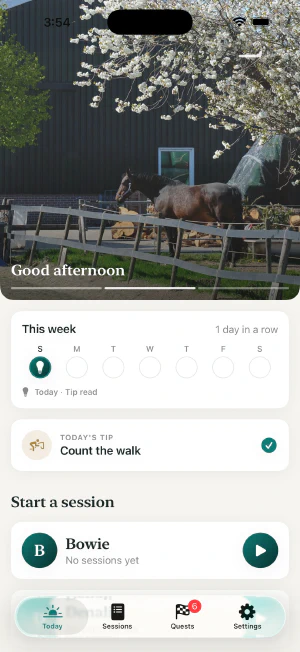
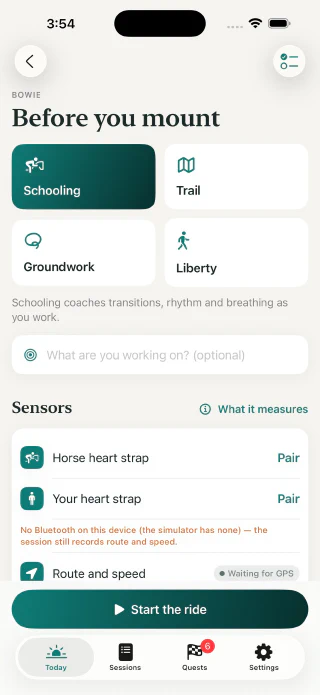
The session setup screen for Bowie, with Schooling, Trail, Groundwork and Liberty modes and the two heart straps. The Today screen: a photo of a horse under a cherry tree, this week's activity, today's tip, and a card to start a session with Bowie.

Long exhale — then ask.

Works with Apple Watch

Horse 36 bpm
Rider 78 bpm

Drawn to tempo. A horse at rest beats about half as fast as the person standing beside him.

Why it exists

The lesson ends, and most of it leaves with the trainer.

It started with one rider.

Kirstin rides two horses, Bowie and Denali. She has a lesson or two a week and rides alone the rest of the time, with only her memory of how each ride felt.

She wanted those rides to have a voice while they happen and a record once they are over. Her son started building one.
  • The correction fades

    The aid that finally worked in the lesson is hard to recall by the next ride.

  • Most rides happen alone

    Nobody is at the rail to say what they saw.

  • Your trainer starts cold

    The next lesson begins with catching up on the rides in between.

How a session goes

Strap up, ride, look back.

  1. Strap up

    One chest strap on his girth, one on you. Choose Schooling, Trail, Groundwork or Liberty, and say what you are working on.

    Choosing a session mode for Bowie: Schooling, Trail, Groundwork or Liberty.
  2. Ride

    The phone stays in your pocket and the coach speaks through your headphones. It speaks when something is worth saying and stays quiet the rest of the time.

    Count it: one-two, one-two.

    Long exhale — then ask.

    Good. Keep that breath.

  3. Look back

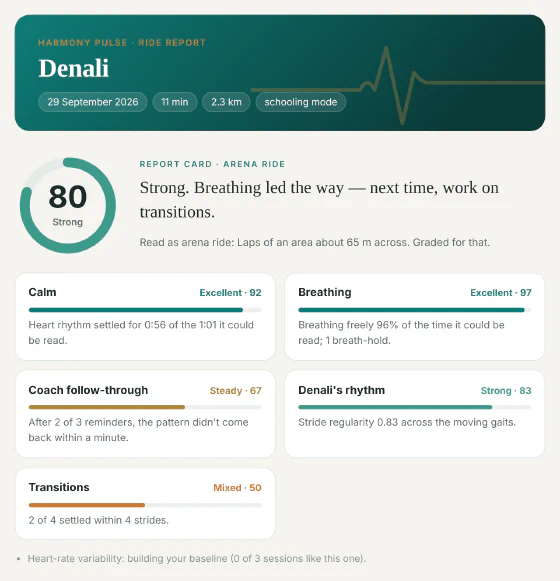
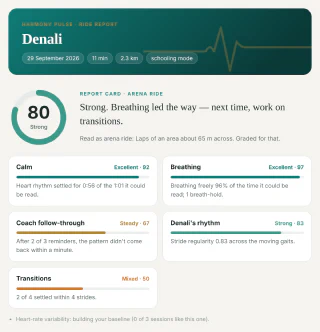
    Every session ends with a report card, a heart-rate chart, a map of where it happened and a short debrief.

    A sample report card: an overall score of 80, with separate grades for calm, breathing, follow-through, rhythm and transitions.
  4. Keep practising

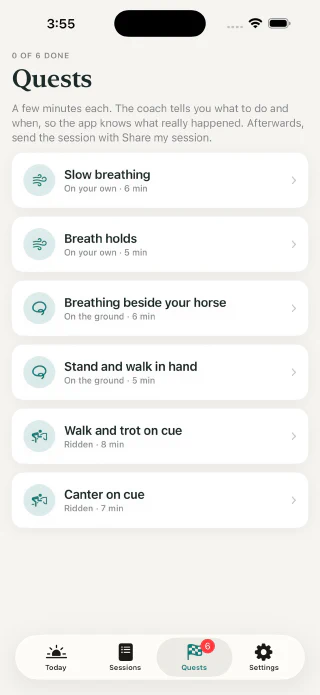
    Quests are short guided sessions, from six minutes of slow breathing to walk and trot on cue. A daily tip keeps the habit going.

    The Quests screen, listing six guided sessions from Slow breathing to Canter on cue.

The app screens on this page are the real app, running a development build.

No service

No signal needed

It works where the wifi does not reach.

Ranches and barns are some of the worst places for wifi and cell service. Harmony Pulse was built for that. Everything it does during a ride and after it happens on the phone in your pocket.

Works with no connection

  • Both heart straps

    They talk straight to the phone over Bluetooth.

  • The coach

    The rules and every recorded line live inside the app.

  • Recording and the route

    GPS comes from satellites, so the route is traced with no service.

  • The report card and debrief

    Graded and written on the phone as soon as you finish.

  • The trainer report

    Saved as one file, ready to send when you are back in range.

Waits until you are back in range

  • Sending a report to your trainer.
  • The satellite photo behind the route map.
  • No account

    There is nothing to sign up for and no password to lose.

  • Nothing uploaded

    Your rides stay on your phone unless you choose to send one.

  • Old rides get better

    Every sensor reading is kept as it arrived, so each improvement to the app re-reads the rides you already have.

What it listens for

What each strap tells it

Both straps are off-the-shelf Polar H10 heart monitors. The one on the girth also carries a motion sensor, and that is how the app knows what his feet are doing.

From his strap

Gait
Halt, walk, trot and canter, read from how the girth moves.
Rhythm and tempo
How even his strides are, and whether the tempo is creeping.
Transitions
How many strides it takes him to settle into the new pace.
Effort and recovery
His heart rate against what this pace usually costs him.

From yours

Breathing
The moments you stop breathing, usually right before you ask for something.
Calm
How smooth and even your heart rhythm is at halt and walk.
Heart-rate zones
How hard you were working, minute by minute.

The coach

Short, calm lines, written by a person.

Every line the coach can say was written by hand and recorded in two voices. Fixed rules decide when a line is spoken. No AI model runs while you ride, so the coach cannot make something up.

Rhythm

Tempo's creeping — steady it.

Calm, four-beat walk.

Your breath

Breathe.

Drop your shoulders, slow your breath.

For him

Ease off a moment — let him catch his breath.

He's still blowing — stay in walk a while longer.

Praise

Nice, same rhythm through the transition.

Lovely, even breathing — stay with it.

6 spoken, 22 held back

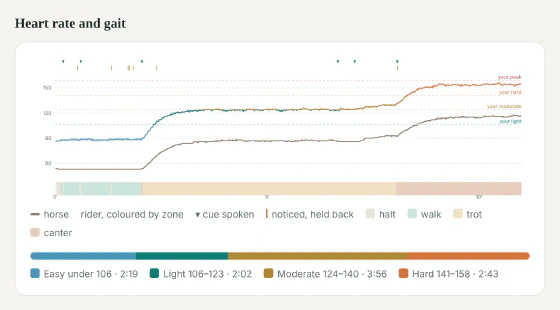
In the sample ride below, the coach noticed 28 moments and spoke about six of them.

After the ride

Something to show your trainer.

The whole session comes out as one file you can send. Your trainer opens it in any browser and arrives at the next lesson already knowing what happened.

The top of a sample trainer report for Denali: an 11-minute schooling ride graded 80, Strong. A sample chart of horse and rider heart rate across the ride, with gait bands underneath and marks where the coach spoke.
A sample report, made by the app from a simulated ride.
  • A grade once you are done

    Calm, breathing, rhythm and transitions each get a score. The app never scores you while you ride.

  • Both hearts on one chart

    His and yours, over the gaits, with a mark wherever the coach spoke.

  • Where it happened

    The route on a map, with the moments worth a look numbered on it.

  • Your own words

    The notes you write after a session are printed on the report.

Where it stands

The whole loop is built, and now it is learning from real rides.

  • It works end to end

    Recording, live coaching, debrief and trainer report all run on an iPhone, with an Apple Watch app for marks and voice notes.

  • New builds keep coming

    Kirstin rides with each one, and her notes shape the next.

  • Tested on real rides

    Schooling, trail, groundwork, liberty and solo practice, with Bowie and Denali.

  • Started 26 August 2026

    From the first line of code to a coach that talks took about five weeks.

Where it is goingNot built yet

Next, a coach that remembers your lessons.

This part is Kirstin's idea. A lesson or a clinic costs real money, and most of what was taught is gone by the next ride. She wants the app to keep it and turn it into something she can ride from.

  1. Capture

    Record a voice memo at the rail, add video if you have it, and say how the ride felt.

  2. Return

    Get the takeaways back in plain language, with a short riding plan for the week.

  3. Refine

    Answer with a question, a correction, or what the horse actually did.

  4. Carry

    The next session picks up where the last one stopped, so the same horse and the same habit stay in view.

None of this replaces a trainer. It carries the lesson into the rides in between.

Who is behind it

The rider and the engineer are family.

Kirstin Wright

Rider and first tester

  • Rides Bowie and Denali
  • Tests each version with her own horses
  • Sets the direction for what it becomes

Konrad Wright

Design and engineering

  • Designed and built the iPhone and Apple Watch apps
  • Fifteen years of professional software work
  • Early engineer at Draftboard, acquired by DraftKings

What happens next

First, it becomes everything one rider wants it to be.

There is no launch date and no price yet. The plan is to finish it properly for Kirstin and her horses, then decide where it goes. If you ride or train and want to follow along, say hello.

KonradWright@Protonmail.com